A browser-based alternative to MySQL Workbench
Planche is a MySQL Workbench alternative for developers who primarily need to write SQL, edit rows, browse database objects and inspect relationships. Its interface runs in a browser, while the local Planche Agent opens the MySQL connection. It does not claim to replace every modeling, migration or server-administration tool in MySQL Workbench.
Open the MySQL client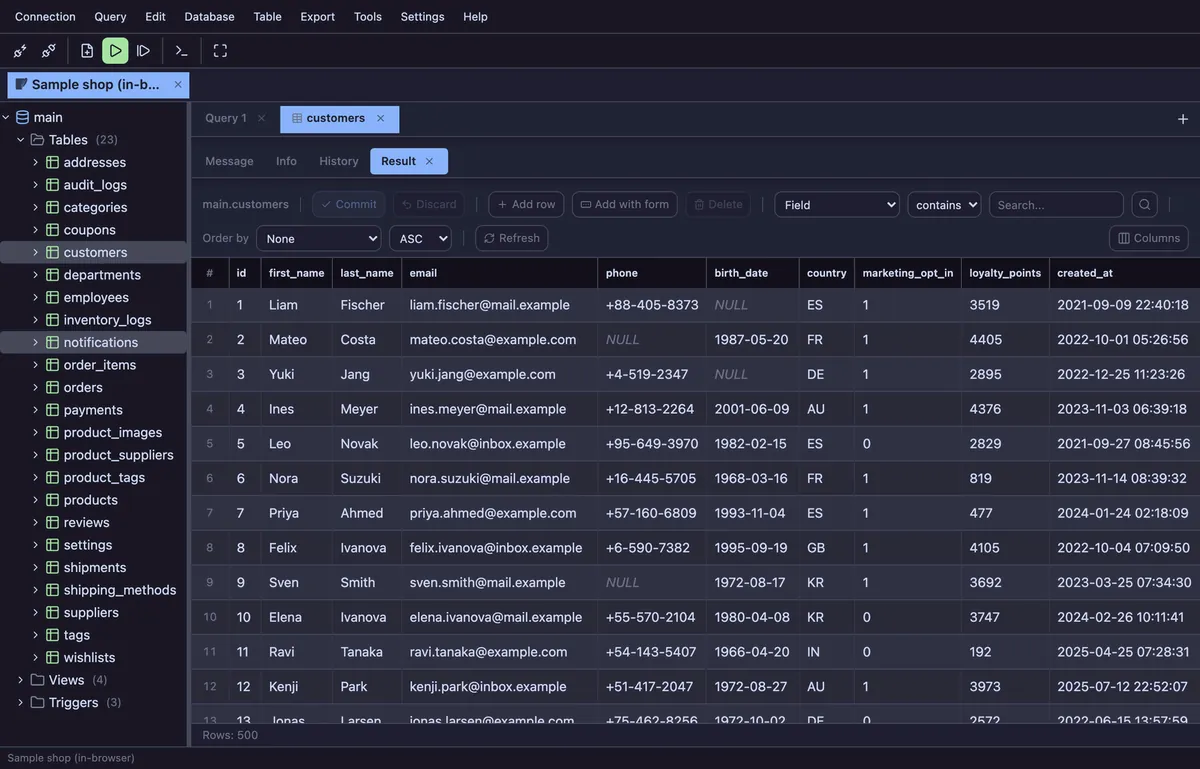
| Consideration | Planche | MySQL Workbench |
|---|---|---|
| Interface | Browser-based UI with a local agent | Desktop application for Windows, macOS and Linux |
| Database focus | MySQL plus MariaDB, PostgreSQL, SQLite, SQL Server, Oracle and selected hosted services | Purpose-built for MySQL |
| SQL and data work | SQL editor, editable grid, schema tree, query history and explain plan | SQL development, result editing and MySQL object management |
| ERD and modeling | ERD generated from existing foreign keys; table designer for supported objects | Full visual data modeling, reverse engineering and forward engineering |
| Administration and migration | Selected MySQL tools such as users, processes, variables and status | Broader MySQL administration, performance and migration tooling |
| Aurora MySQL | Connects to MySQL-compatible Aurora endpoints through the local agent | Can connect as a standard MySQL client; feature compatibility depends on Aurora |
| Cost | Core client is free; advanced features are clearly separated on pricing | MySQL Workbench Community is available free of charge |
A focused client for daily MySQL work
Planche’s MySQL client supports MySQL syntax highlighting, autocomplete, multi-statement scripts, DELIMITER, editable results, schema objects, users, processes, server variables, status, ERD and production safety controls.
If you use Amazon RDS or Aurora, the same MySQL connection form accepts its endpoint, port, database user and password. The Aurora MySQL guide covers writer and reader endpoints, TLS and private-network access.
What Planche does not replace
MySQL Workbench provides comprehensive visual modeling, database migration, server administration and performance tooling. Choose Workbench when those are central to the job. Choose Planche when you want a lighter browser workspace for querying and data work across MySQL and other supported databases.
Questions
Is Planche a free MySQL Workbench alternative?
The core Planche client is free with no account or time limit. The SQL editor, editable grid, schema browser, ERD, history and core safety controls are included. MySQL Workbench Community is also free.
Can Planche completely replace MySQL Workbench?
Not for every workflow. Planche covers day-to-day SQL, data editing, schema browsing, an ERD and selected MySQL administration. Workbench has broader modeling, migration, administration and performance features.
Does Planche support Amazon RDS and Aurora MySQL?
Yes. Enter the RDS or Aurora MySQL endpoint as the host. Planche connects with its MySQL driver through the local agent. See the Aurora MySQL client guide.
Do MySQL credentials go to planche.dev?
No. They travel from the browser to the Planche Agent on your machine, which opens the MySQL connection. Optional Connection sync uploads profiles only after browser-side encryption with your own passphrase.
Does Planche support SSH tunneling?
Yes, as a Pro feature. It supports password, private-key and ssh-agent authentication and reads ~/.ssh/config.
Free to use
Planche has a free tier that needs no account and uploads none of your data — connection profiles live only in your browser. A few advanced features need Pro; see pricing.